Play With Viewers






Allows users to join (or moderators to add/remove) people to the 'waiting queue' to keep track of who has next
Download Play With Viewers
Click the button below to download Play With Viewers! If you find it useful, consider leaving a tip to support development.
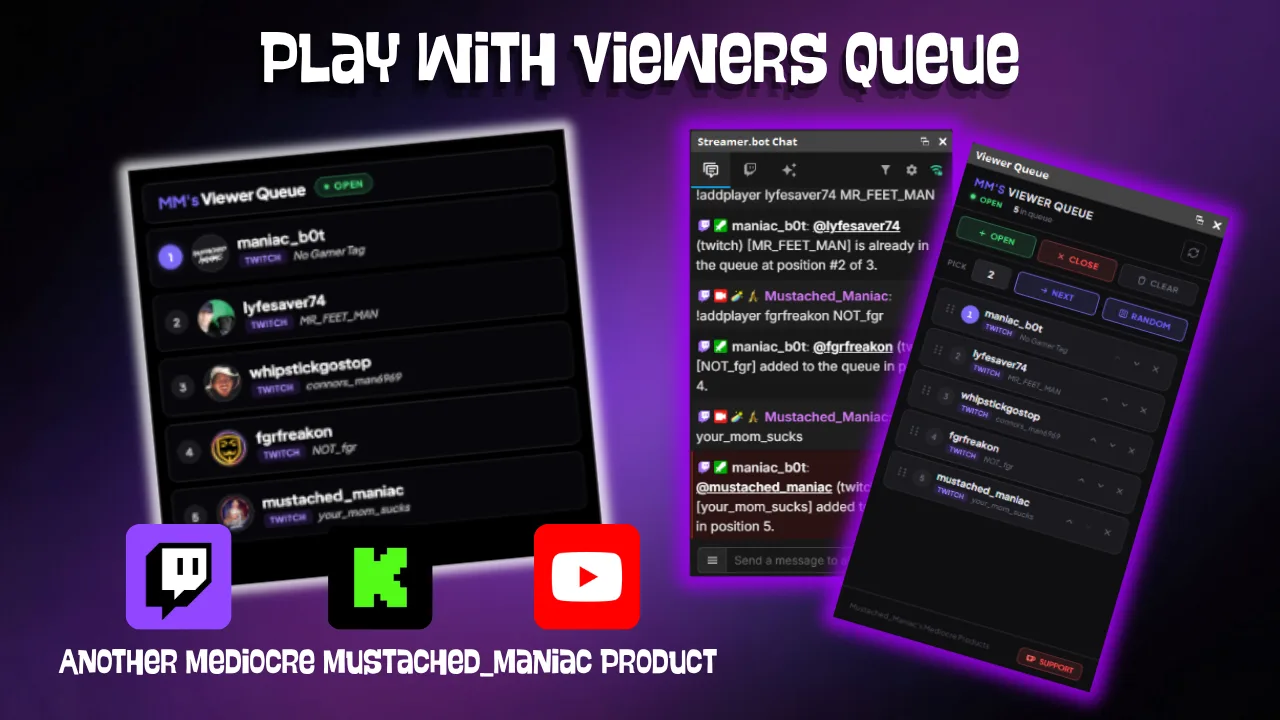
This Streamer.bot extension makes it easy to manage a "who's next" queue when playing with viewers. Viewers can join themselves via chat commands, or you (and your moderators) can add, remove, reorder, and pick people directly from a Dock — with a clean overlay your viewers can follow along with on stream.
Adding the DLL
How Play With Viewers Works
The extension has two components:
- Dock — A compact control panel you add to OBS/Meld/SLOBS. From the dock you can:
- Open / close the queue to new joiners
- Add or remove viewers manually
- Reorder the queue with the up/down buttons on each entry
- Randomly pick N viewers from the queue with the Pick control
- Overlay — A fully transparent browser source that displays the current queue for your viewers, with optional avatars, platform badges, gamertags, and position numbers.
Customizing the Overlay URL
Live Preview
Customizing the Dock URL
Available Chat Commands
All of the commands listed below are NOT case-sensitive and can be customized for your stream/community.
| Command | Feature | Aliases | Modifiers | Notes |
|---|---|---|---|---|
!addPlayer | Adds player to the queue | — | optional gamertag | Adds the viewer to the end of the queue when it's open. |
!nextPlayer | Shows the next player | — | 3 | Displays information about the next player in the queue (a number following the command will show that many next positions). |
!checkQueue | My position | — | — | Tells the viewer where they are in line. |
!closeQueue | Close queue | — | — | Mod-only — prevents new joiners (existing entries stay). |
!clearQueue | Clear queue | — | — | Mod-only — empties the queue entirely. |
!join | Join the queue | — | optional gamertag | Adds the viewer to the end of the queue when it's open. |
!leave | Leave the queue | — | — | Removes the viewer from the queue. |
!openQueue | Open queue | — | — | Mod-only — allows new viewers to !join. |
!removePlayer | Remove player | — | — | Mod-only — removes a specific player from the queue. |
!randomPlayer | Randomly pick player | — | — | Mod-only — selects a random viewer from the queue. |
Available Streamer.bot Arguments
The following arguments are pushed with each queue update and are available in any Streamer.bot action tied to this extension.
| Argument | Type | Description |
|---|---|---|
queueJson | string | JSON array of the current queue entries |
queueCount | int | Number of viewers currently in the queue |
queueIsOpen | bool | Whether the queue is currently accepting new joiners |
queueAutoCloseAt | string | If enabled, the time at which the queue will automatically close (will be blank if auto close is off) |
nextPlayerName | string | Display name of the next viewer in the queue |
nextPlayerPlatform | string | Platform of the next viewer in the queue |
nextPlayerGamerTag | string | Gamertag of the next viewer in the queue |
lastAction | string | The last action performed on the queue (e.g., 'Open', 'Added', 'Removed', 'Picked') |
lastActionPlayer | string | The display name of the player involved in the last action (if applicable) |
lastActionMessage | string | The chat message (if enabled) describing the last action performed on the queue |
